Timing, feedback and forgiveness turn controls that work into controls that feel great. Techniques you can try today, with Unity code.
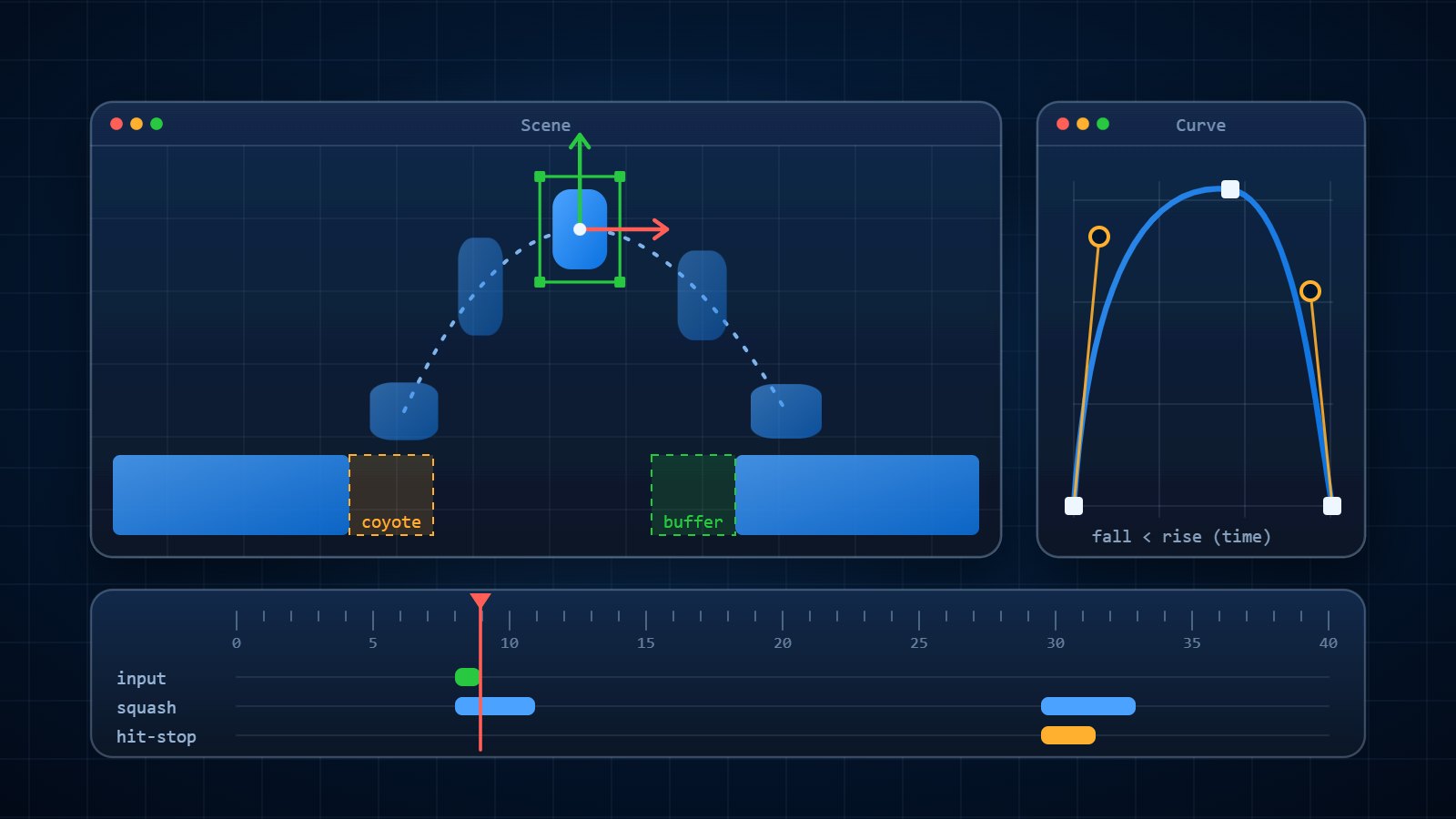
Players rarely talk about game feel, but they notice it in seconds. Two jumps can use the same animation and the same height, and one of them feels heavy. The difference is usually in timing, feedback and forgiveness.
Answer at once
Something should change on the first frame after the input: a sound, a small squash, a flash. The full action may take longer. If the character must turn before it runs, let the dust appear first.
Forgive small mistakes
Good controls follow what the player meant, not only what the player pressed.
- Coyote time: for a few frames after leaving a ledge, a jump still works.
- Input buffer: a jump pressed shortly before landing happens on landing.
- Fair hit boxes: a little smaller than the picture for the player, a little larger for coins.
In Unity, the first two are a few lines:
csharpvoid Update() {
    coyote = grounded ? 0.1f : coyote - Time.deltaTime;
    buffer = Input.GetButtonDown("Jump") ? 0.1f : buffer - Time.deltaTime;
    if (coyote > 0f && buffer > 0f) {
        body.velocity = new Vector2(body.velocity.x, jumpSpeed);
        coyote = buffer = 0f;
    }
}
Start with a tenth of a second and change it while you play.
Make impact visible
Small exaggerations tell the player how strong something was:
- Hit-stop: freeze both sides for a few frames on a strong hit.
- Screen shake: short, related to the force, and possible to turn off.
- Squash and stretch: stretch going up, squash on landing.
- Sound: a slightly different pitch each time, so it does not become noise.
Add one at a time. If everything shakes, nothing feels strong.
Make falling faster than rising
Real gravity often feels slow on a screen. Many platform games pull the character down harder on the way down, and cut the jump short when the button is released. The player gets high and low jumps from one button.
Touch screens need more help
On a phone the finger covers the character and there is no edge to feel. Use large areas instead of small buttons, accept a swipe that starts anywhere, and show the answer away from the thumb. A short vibration can replace the feeling of a button. Hyper-casual games live from this: the whole game may be one finger.
Test with new hands
The people who built a level know its secrets. Give it to somebody who has not seen it, say nothing and write down where they stop. Change one number, then try again with another person.
A list to try today
- Does something react on the first frame?
- Do late and early jumps work?
- Can a player who switches off the sound still read a hit?
- Can shake and vibration be turned off?